1) For the first time since 2005, I'm operating portable;
stationary bicycle mobile, actually, on the Nashua River Rail Trail.
While I've always been an active cyclist, my new Icom® IC-705 and AH-705 (and
a laptop)
provide a strong incentive to combine my main interests. So here I am.
As with any DX session, I begin by seeing if there are any stations I need.
With my phone serving as a cellular hotspot, I fire up the
DX Spot Checker on the laptop and let it run.
As each spot arrives, the DX Spot Checker checks my Station Log
database and ...
Lets me know by colorful
rich-text in the Rich Site Feed, whether I need a QSO with the
station for a new or verified
DXCC® entity, band-entity, or mode entity:

And if I preferred the Grid Feed, it lets me know by customizable text in the DXCC Status and
Mode Status columns,
the same information;
that is, whether I need a QSO with the station for a new or verified
DXCC entity, band-entity, or mode
entity:

The choice of Feed, of course, is up to you!
Well, as you can see, there are several spots I need for a new or verified DXCC entity, band-entity, or mode
entity!
But one stands out among them!
But what are my chances of working him? ...
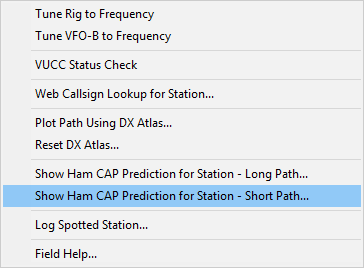
To find out, I single-click the call sign, right-click, and run a short-path propagation prediction in
Ham CAP.1
Ham CAP's Chart appears ...

Or
Ham CAP's Map appears ...
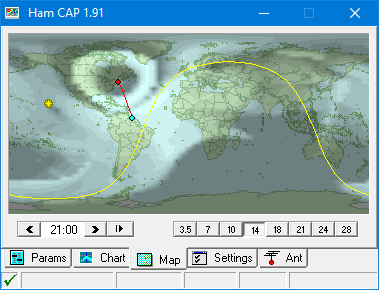
... depending on the initial display tab setting in Preferences.
After viewing the prediction, I decide my chances are pretty good! ...
So I click Tune Rig to Frequency on the shortcut menu; my IC-705 tunes to 14197 SSB.2
A few minutes later ...
Suriname is mine!
Number 48 on the DXCC-Portable hit parade!
1 — Software licenses for and installation of Afreet Ham CAP and Afreet Omni-Rig are required to use Ham CAP (both free at the time of this writing).
2 — Through integration with Afreet Omni-Rig. The DX Spot Checker also picks up the decimal point of the frequency, even though it is not highlighted.
Home |
Checking DX Spots |
Adding the Log Entry and Automatically Uploading to LoTW |
Using JT Log Entry Processing
Using the Outgoing QSL Web Service |
Creating QSL and Address Labels |
Printing QSL and Address Labels |
Capturing an Improv Image
Managing Paper QSLs |
Managing LoTW QSLs |
Monitoring Performance |
Analyzing Your DXCC Status |
Other Fine Features |
Implementation and More
Click Here to Return Home
Icom® is a registered trademark of Icom Incorporated (Japan) in the United States,
the United Kingdom, Germany, France, Spain, Russia and/or other countries.