13) Let's take a look at the Performance report and map I just created!
Station Log lets me output reports to the
DXtreme Active Report Viewer
and the
DXtreme Standard Report Viewer,
and my printer, too, but I like on-line better.
The Active Report Viewer lets you view and sort reports
in Microsoft® Internet Explorer® Version 8.0+
and Microsoft Edge™ in Internet Explorer Mode.
Refer to the Station Log 15 Data Sheet for important information about the Active Report Viewer.
The Standard Report Viewer lets you view reports
locally in Brave™, Google™ Chrome™, Google Chromium™, or Vivaldi™ and on-line
(following optional FTP upload) in those browsers plus Arc™®,
Microsoft® Edge, Mozilla® Firefox®, and Apple® Safari®.
By default, the reports appear on your local PC, but you can
configure them so they appear on the Internet (more about this later).
 Standard Report Viewer: Click here to view this on-line Performance report
in the Standard Report Viewer using
Brave™, Google™ Chrome™, Google Chromium™, Vivaldi™,
Arc™®, Microsoft® Edge, Mozilla® Firefox®, or Apple® Safari®.
By the way, on-line Help systems come with the Active Report Viewer
and Standard Report Viewer to help you (and your friends) view your reports.
Oh, and here's my map of entity pins in DX Atlas1!
One color for worked entities, another color for verified entities,
which you can set in the Preferences module, of course.
All the pins are Green because that's my verified color.
And I did request LoTW-verified records.
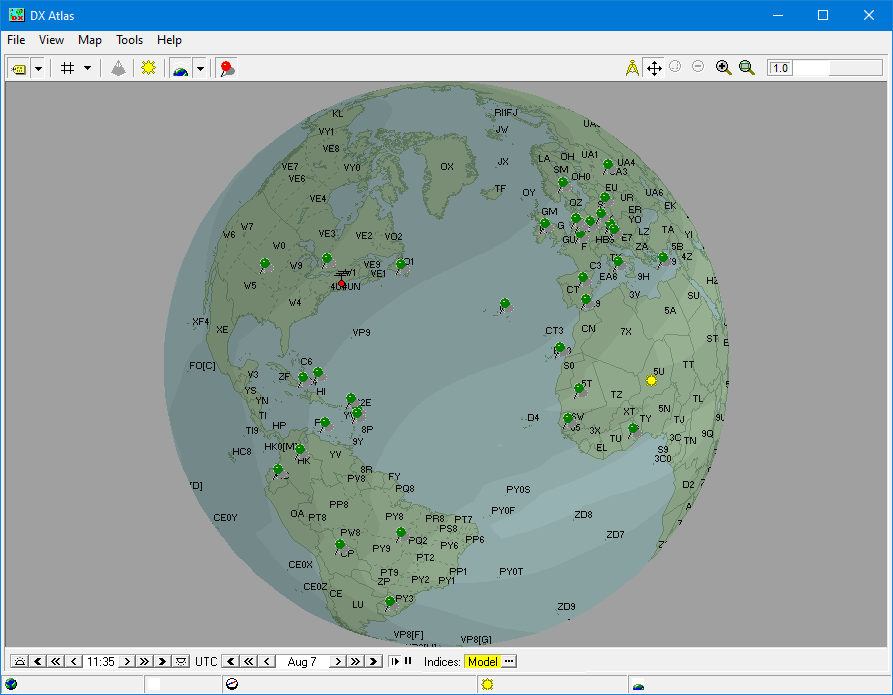
You can change the projection and rotate, resize, and zoom the map as desired.
1 — A software license for DX Atlas is required only if you want to use DX
Atlas.
Home |
Checking DX Spots |
Adding the Log Entry and Automatically Uploading to LoTW |
Using JT Log Entry Processing
Using the Outgoing QSL Web Service |
Creating QSL and Address Labels |
Printing QSL and Address Labels |
Capturing an Improv Image
Managing Paper QSLs |
Managing LoTW QSLs |
Monitoring Performance |
Analyzing Your DXCC Status |
Other Fine Features |
Implementation and More
Click Here to Return Home