8) I recently purchased an Icom IC-9700 for weak-signal DXing on 144,
432, and 1240 MHz.
Nice radio!
But wouldn't you know it!
For several months after it arrived, long-distance VHF/UHF
propagation was nonexistent here in NH.
Or so it seemed. Was it my fault? My work schedule being too full?
Maybe. I know I missed some really good meteor-shower peaks
and perhaps some 2-Meter Sporadic-E openings.
But as my Dark-eyed Junco friend from Québec might tweet, "C'est la vie!"
Adding, "There's no crying in Ham Radio."
Well, then came July 14, 2021.
I was on 6 Meters multihopping it to the Pacific coast on my IC-7700
when I noticed E-skip shortening up ... a good sign 2-Meters might open.
I fired up the IC-9700, opened WSJT-X, and waited a few minutes....
Bam! Stations from Minnesota, Iowa, Wisconsin appeared ... what a thrill!
It was then I knew I'd be using Improv Imaging to capture
souvenir screenshots of
the IC-9700/WSJT-X action as I logged the QSOs.
I'll show you one now, for the most distant QSO.
I started the log entry and clicked
the Improv Imaging tab.
Then I double-clicked the File caption,
which generated a suggested file name.
I clicked the Execute button. The New Improv Image command box appeared.
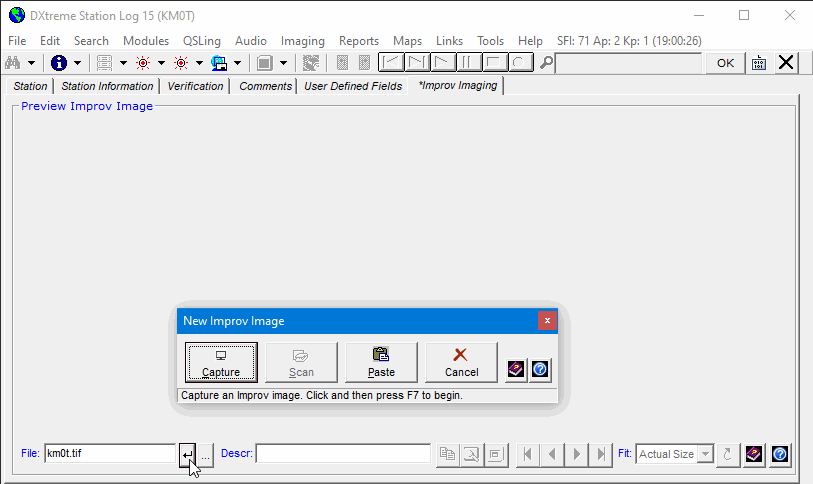
Next, I clicked Capture, pressed F7 on my keyboard, held down the left mouse
button,
and dragged the selection rectangle from the upper-left to the lower-right on
the WSJT-X window.
When I released the mouse button, the image appeared in the re-sizeable Improv Imaging application.
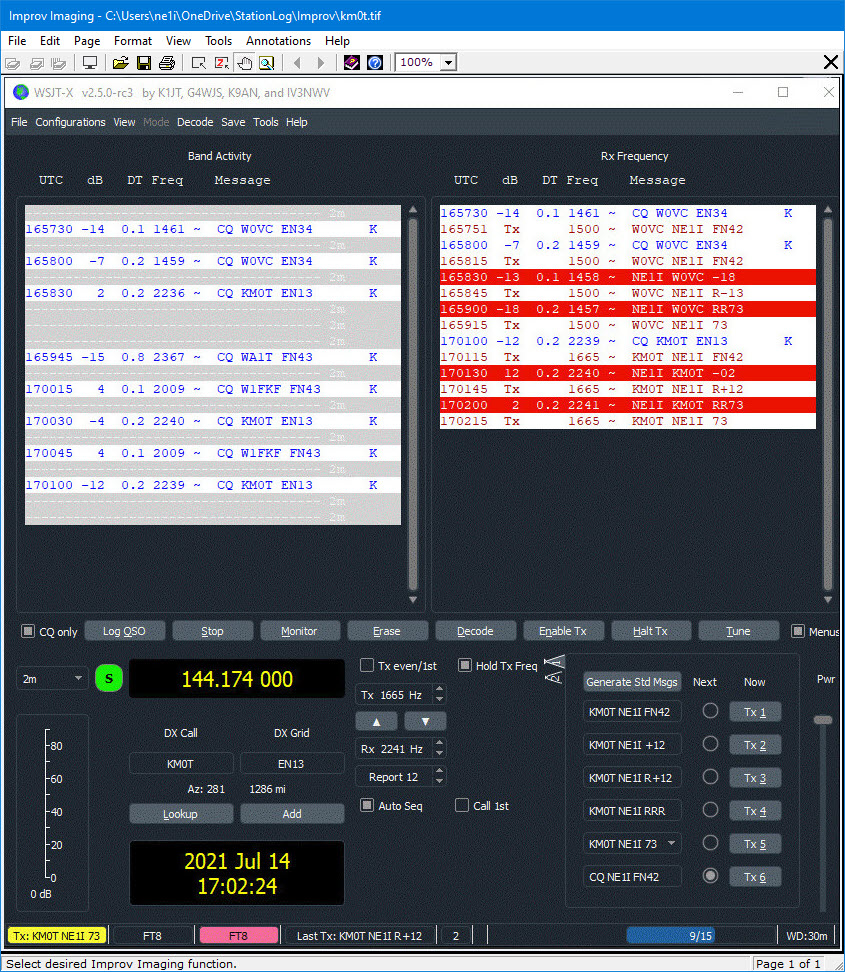
Where I could perform general imaging functions, if I wanted to, like adding additional
image pages to multipage image files.
After I closed the Improv Imaging application, a preview of the Improv image
appeared on the Improv Imaging tab, where I added a description.
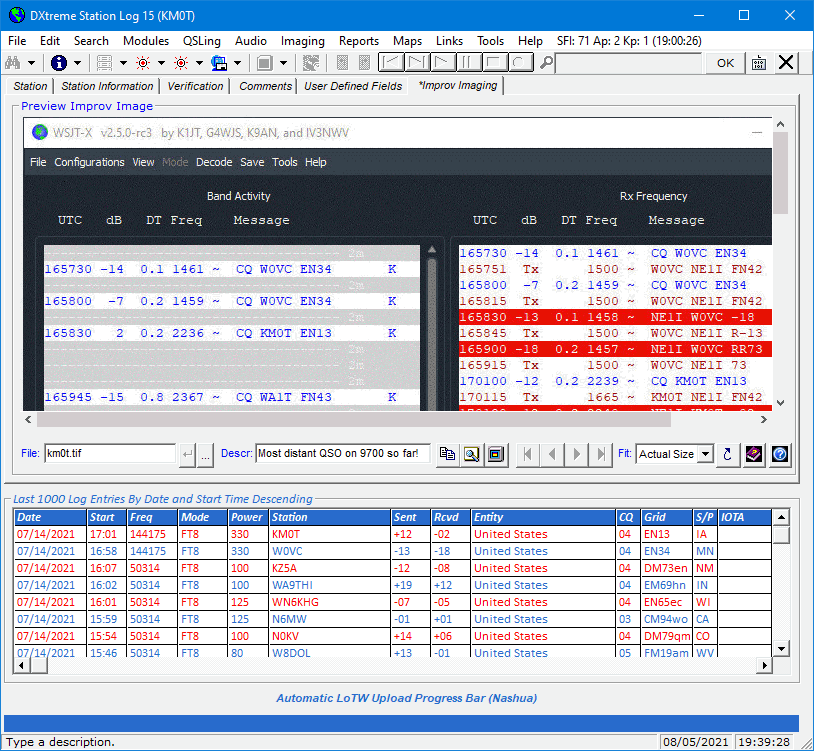
Now I can preview the Improv image any time I want to,
and display it full-size in the
re-sizeable Improv Imaging application whenever I want!
And I can use the remaining command buttons on the lower-right-side of the previewer to copy
the image to the Clipboard, magnify the image, navigate a multipage image file, invoke
a fit-image option, and refresh the image.
I click OK to save the log entry. When I display the log entry again someday,
I'll have a picture to enjoy along with the memory.
Oh, one more thing about Improv Imaging ...
It has an Improv Image Explorer that lets you peruse the images in your Improv folder.
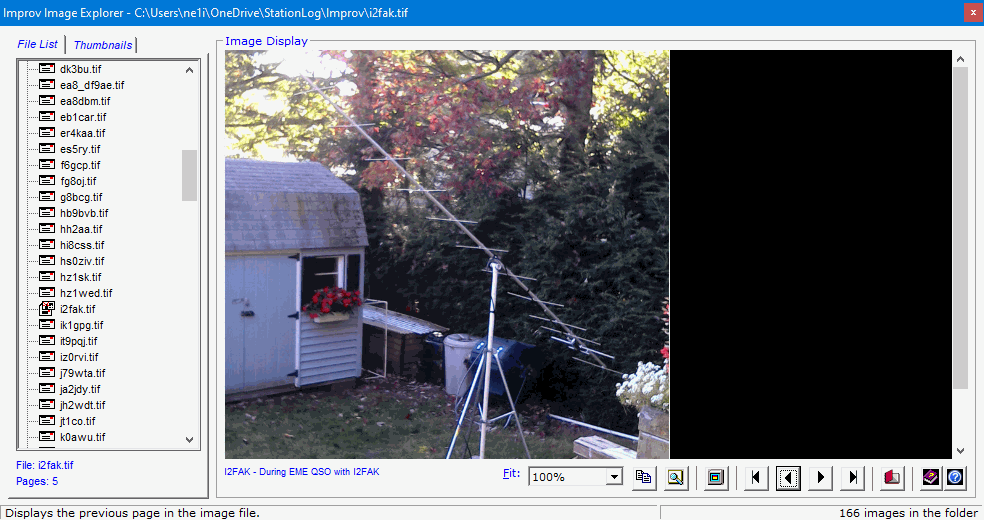
The Explorer has many features, but the one I like best is the Display function

which lets you load, in the Station Log window, the log entry associated
with the Improv image you're viewing.
Makes the Explorer act like a Search window!
Nice.
By the way, there's a QSL Image Explorer, too, for perusing images in
your QSLs folder.
It has the same features as the Improv version.
Read the DXtreme Station Log 15 Data Sheet
for more information about Improv Imaging and QSL Imaging.
Home |
Checking DX Spots |
Adding the Log Entry and Automatically Uploading to LoTW |
Using JT Log Entry Processing
Using the Outgoing QSL Web Service |
Creating QSL and Address Labels |
Printing QSL and Address Labels |
Capturing an Improv Image
Managing Paper QSLs |
Managing LoTW QSLs |
Monitoring Performance |
Analyzing Your DXCC Status |
Other Fine Features |
Implementation and More
Click Here to Return Home